In our interconnected world, security has moved beyond physical barriers into the digital realm. Cybersecurity breaches, data theft, and online fraud are now common, affecting individuals and organizations globally. For instance, the average cost of a data breach in 2026 reached an all-time high of $4.45 million, a 15% increase over three years.
As technology advances, so do the accompanying threats. In this era of heightened vulnerability, with over 80% of cyberattacks involving human error, knowledge is a key defense.
This article provides insights into essential topics for your core security awareness training program for 2024. It also offers practical strategies for promptly educating your staff in these crucial areas.
Table of Contents
What is Security Awareness?
Security awareness is an organization’s knowledge and attitude regarding information asset protection. Training teaches employees to recognize and respond to cyber threats. This reduces risk from phishing, malware, and social engineering attacks.
NIST SP 800-50 emphasizes building a culture of vigilance and responsibility. Employees learn to spot suspicious emails and avoid unsafe behaviors. Real-world scenarios, like recognizing a fake invoice, make training practical. Organizations investing in security awareness see measurable reductions in successful attacks and data loss.
What Are Security Training Topics?
Security training topics are specific areas of focus within a security awareness program designed to educate employees about threats and safe behaviors. These topics help organizations reduce risk by addressing the most common attack vectors and human errors. In 2025, prioritizing relevant security awareness training topics is critical—Verizon’s 2024 Data Breach Investigations Report found that 74% of breaches involved the human element, including social engineering and error.
Effective security training topics matter because targeted education directly reduces incidents. Employees who recognize phishing, use strong passwords, and report suspicious activity help prevent costly breaches. Organizations that regularly update training topics see measurable improvements in security posture and compliance.
Phishing and social engineering
Password management
Physical security
Data privacy and handling
Mobile device security
Remote work best practices
Incident reporting
Insider threats
Social media safety
Malware and ransomware awareness
Security Awareness Best Practices
Security awareness best practices are proven methods for designing, delivering, and measuring effective training. Following standards from NIST, SANS, and CISA ensures programs address real risks and drive lasting behavior change. Organizations that apply these practices consistently report fewer incidents and stronger compliance outcomes.
Align training with real threats and business risks
Use a mix of delivery methods (online, in-person, simulations)
Update content regularly to reflect new attack trends
Measure effectiveness with metrics like phishing click rates and reporting rates
Reward positive behaviors and reinforce learning over time
Top 5 Security Awareness Best Practices for 2026:
Map training to NIST SP 800-50 and SANS Security Awareness Maturity Model
Run quarterly simulated phishing campaigns
Deliver microlearning refreshers monthly
Track and report KPIs to leadership
Solicit employee feedback to improve content
What are the different types of security awareness training?
Security awareness training comes in several formats, each with unique strengths and limitations. Choosing the right type depends on organizational goals, workforce size, and risk profile. The table below compares the most common types of security awareness training, including their pros, cons, and best use cases.
Type | Pros | Cons | Best Use Cases |
|---|---|---|---|
In-person Workshops | High engagement, real-time Q&A, tailored content | Resource-intensive, limited scalability | Small teams, leadership training, compliance refreshers |
Online Modules | Scalable, self-paced, easy tracking | Lower engagement, risk of “click-through” learning | Large organizations, remote staff, onboarding |
Simulated Phishing | Realistic testing, immediate feedback, measurable results | May cause anxiety, requires ongoing updates | Phishing risk reduction, compliance audits |
Gamified Modules | Boosts motivation, competitive elements, higher retention | Development cost, may not suit all cultures | Millennial/Gen Z teams, ongoing engagement |
Microlearning | Short, focused, fits busy schedules | Limited depth, may miss context | Reinforcement, just-in-time reminders |
Case Study: Effective Security Awareness Training in 2026
One global manufacturing firm reduced phishing click rates by 67% in 12 months through targeted security awareness training. The company combined monthly simulated phishing campaigns, interactive e-learning, and quarterly in-person workshops. Leadership tracked metrics and adjusted content based on real attack trends, following SANS and NIST best practices.
Before the program, 21% of employees clicked on simulated phishing emails. After a year, that number dropped to 7%. The firm also saw a 3x increase in reported suspicious emails, indicating stronger vigilance. Employees cited gamified modules and real-world breach stories as the most memorable elements.
Monthly phishing simulations with immediate feedback
Quarterly workshops focused on emerging threats
Microlearning modules for ongoing reinforcement
Leadership buy-in and transparent reporting of results
The main lesson: Consistent, relevant, and engaging training—supported by leadership and measured with clear KPIs—drives real improvements in security culture and risk reduction.
Top 15 Security Awareness Training Topics
The top security awareness training topics for 2025 address the most common and emerging threats facing organizations today. Phishing remains the #1 attack vector in 2024, accounting for over 36% of breaches (Verizon DBIR 2024). Effective training covers both technical and human factors to reduce risk.
The security awareness program is a vital component of modern cyber security efforts, aimed at equipping individuals and organizations with the knowledge and skills necessary to defend against cyber threats. These top 15 security awareness training topics cover a wide range of critical concepts:
1. Passwords and Authentication
Strong password management is a frontline defense against unauthorized access. The best approach is to combine complex, unique passwords with multi-factor authentication and secure management tools. Microsoft Security Blog and NIST SP 800-63B both recommend these practices for reducing credential-based attacks.
Use a password manager to generate and store unique passwords for every account
Enable multi-factor authentication (MFA) wherever possible—MFA blocks over 99% of automated attacks (Microsoft, 2024)
Avoid password reuse across work and personal accounts
Change passwords immediately if a breach is suspected, but routine forced changes are no longer recommended by NIST unless there is evidence of compromise
Never share passwords or write them down in unsecured locations
The first and simple way to stay protected from threats is to have effective and strong passwords. The importance of passwords is often overlooked. Password security is the company’s security. Commonly used passwords are easy to guess by threat actors. Using easily guessable passwords or employing recognizable password patterns among employees can significantly simplify the task for cybercriminals seeking unauthorized access to a wide array of accounts.
Using randomized passwords that are complex will make it difficult for the attackers to crack. 2FA can also act as another layer of protection in such cases.
Educate about password policy and its usage:-
A password policy is a collection of rules and regulations that a company or system administrator has set up to control how passwords are created, used, and managed. These include password length, character combinations, etc.
The following are the criteria a password policy specifies:
Elements | Description |
|---|---|
Password Length | Sets the minimum and maximum lengths for passwords that users can create |
Complexity | Employees need to use a mix of character types in passwords, such as capital letters, lowercase letters, digits, and special symbols. |
Expiration | Requires users to change their passwords on a regular basis (for example, every 90 days) in order to limit the danger of hacked credentials. |
History and Reuse | Prevents users from reusing a set number of previously used passwords in order to avoid recycling outdated, potentially hacked passwords. |
Lockout Policies | Limits the number of failed login attempts before temporarily locking an account to prevent brute force attacks. |
Account Lockout Duration | Determines how long an account remains locked before being automatically unlocked or requiring administrator involvement. |
Account Unlocking | Describes the process of unlocking locked accounts, which usually involves contacting a system administrator. |
Password Recovery and Reset | Describes processes for securely retrieving or resetting forgotten passwords. |
Two-Factor Authentication (2FA) | Encourages or mandates the use of multi-factor authentication in addition to passwords to improve security. |
The Employees should have a basic understanding of password policy which will help them create a stronger password and knowledge of security controls around passwords.
2. Physical Security
Physical security breaches often result from simple mistakes—like leaving sensitive documents exposed or failing to challenge unauthorized visitors. In 2023, a healthcare provider in Texas suffered a data breach when an intruder accessed an unlocked office and stole files containing patient information. Security awareness best practices, such as strict badge policies and visitor management, could have stopped the incident.
Real-world scenario: An employee at a financial firm let a “maintenance worker” into a restricted area without verifying credentials. The individual stole backup drives, leading to a costly data leak. Awareness training would have taught staff to verify all visitors and report suspicious behavior immediately.
Enforce a badge policy—require visible ID at all times
Challenge unfamiliar faces and verify visitor credentials
Implement visitor sign-in and escort procedures
Lock unattended workstations and secure sensitive documents
Follow a clean desk policy—no passwords or confidential info left out
Shred sensitive documents before disposal
Install surveillance cameras in critical areas
Security awareness best practices reduce risk by making physical security everyone’s responsibility. Regular training and clear policies help prevent costly breaches.
Access Control | Physical access control to data centers, server rooms, and other important infrastructure is a critical component of physical security. |
Social Engineering | Help employees to know about the dangers of social engineering, which involves duping people into providing unauthorized access to facilities or sensitive information |
Secure Disposal | Proper hardware and media disposal is a vital part of security. |
Physical Security Policies | Physical security policies and procedures to govern the protection of physical assets and infrastructure. |
Managing and monitoring who has access to a facility, location, or asset. This may entail the use of keys, keycards, access badges, biometrics, cameras, or security staff.
3. Mobile Device Security
Best practices for mobile device security include enabling device encryption, using strong passcodes, and keeping software updated. According to Verizon’s 2024 Mobile Security Index, 74% of organizations experienced a mobile-related security incident in the past year—most due to weak device controls or outdated software. Security awareness best practices help reduce these risks by teaching employees to secure their devices proactively.
Mobile device security is essential because smartphones and tablets store sensitive data—photos, messages, and financial details. If left unprotected, attackers can steal this information or use it for fraud. Security awareness training should cover:
Enabling device encryption to protect stored data
Setting strong, unique passcodes or biometrics
Installing updates promptly to patch vulnerabilities
Downloading apps only from trusted sources
Enabling remote wipe and device tracking features
Disabling Bluetooth and Wi-Fi when not in use
Security awareness best practices empower users to protect both personal and company data on mobile devices. Regular training and clear policies are critical for reducing mobile threats.
4. Using Public Wi-Fi
To stay safe on public Wi-Fi, employees should use a VPN, avoid sensitive transactions, and turn off auto-connect features. Public Wi-Fi networks are often unsecured, making it easy for attackers to intercept data. The 2024 Norton Cyber Safety Insights Report found that 53% of users have connected to public Wi-Fi without security precautions, increasing their risk of credential theft.
How to stay safe on public Wi-Fi:
Use a VPN to encrypt your internet traffic
Avoid accessing sensitive accounts or making financial transactions
Turn off auto-connect to prevent joining rogue networks
Forget public networks after use
Enable two-factor authentication on important accounts
Keep device software and security apps updated
Security awareness best practices teach employees to treat public Wi-Fi as inherently risky. Training should emphasize using secure alternatives and recognizing the signs of malicious hotspots.
5. Social Networks
Security awareness best practices for social networks include never sharing sensitive work information online and being alert to social engineering attacks. Tip: Never share sensitive work information on social media. Attackers often use platforms like LinkedIn or Facebook to gather intelligence and launch targeted phishing campaigns.
Real-world example: In 2022, a cybercriminal posed as a recruiter on LinkedIn and convinced an employee at a European tech firm to download a “job description” document. The file contained malware, which gave attackers access to the company’s internal network. Security awareness training could have prevented this by teaching staff to verify contacts and avoid downloading files from unknown sources.
Set strong privacy settings on all social accounts
Be cautious about accepting connection requests from strangers
Report suspicious messages or profiles to IT/security teams
Think before posting company-related updates or travel plans
Regularly review and update account security settings
Security awareness best practices help employees recognize social engineering tactics and protect both personal and organizational data from online threats.
6. Cloud Security
Cloud security refers to the policies, controls, and technologies that protect data, applications, and infrastructure in cloud environments. Security awareness best practices for cloud use include strong access controls, regular audits, and secure data sharing. In 2024, a major SaaS provider reported a breach affecting 1.2 million users due to misconfigured access permissions (Cloud Security Alliance, 2024).
Use strong, unique passwords and enable multi-factor authentication for cloud accounts
Restrict access based on job roles—apply the principle of least privilege
Conduct regular audits of user permissions and activity logs
Encrypt sensitive data both in transit and at rest
Train employees to recognize phishing attempts targeting cloud credentials
Review and update cloud security policies annually
Monitor for unusual activity with automated alerts
Security awareness best practices ensure employees understand their role in protecting cloud data. Regular training and clear guidelines help prevent breaches caused by human error or misconfiguration.
7. Phishing Attacks
To avoid phishing attacks, always verify sender addresses, avoid clicking suspicious links, and report suspected phishing to IT. Phishing attacks remain a top threat—APWG reported over 1.35 million unique phishing sites detected in Q4 2025, the highest on record (APWG Phishing Activity Trends Report, Jan 2026). Security awareness best practices focus on vigilance and rapid reporting to reduce risk.
During the first quarter of 2022, there was a notable surge in phishing attacks, as reported by cybersecurity vendor CheckPoint. According to their 2022 Q1 Brand Phishing Report, a staggering 52% of all phishing attempts worldwide impersonated the professional social networking site, LinkedIn. This marks a significant 44% increase when compared to the preceding quarter, Q4 2021, during which LinkedIn ranked as the fifth most frequently impersonated brand.
Employee awareness is the key to countering this threat. By educating and training employees on phishing awareness, the dangers of phishing, and how to recognize phishing attempts, organizations can build a strong defense.
8. Removable Media
Removable media like USB drives and external disks are convenient, but they carry real security risks. Malware infections from infected devices accounted for 9% of all reported breaches in 2025, according to Verizon’s DBIR. Security awareness best practices help reduce these risks through clear protocols and training.
Best practices for removable media:
Scan all devices before use
Never use unknown USB drives
Encrypt sensitive data
In today’s digital age, the use of removable devices like USB drives, external hard disks, and memory cards is ubiquitous. These handy gadgets serve as digital gateways, allowing the transfer of data between devices quickly and conveniently. However, they also pose significant security risks if not handled carefully.
Employee education on removable device security is vital to ensure that organizations can harness the benefits of these devices while minimizing potential threats.
9. Remote Work Risks
Remote work security best practices: Use secure Wi-Fi, enable VPN, keep devices updated. In May 2024, a major US insurance firm suffered a breach after an employee connected to public Wi-Fi without a VPN, exposing sensitive client data (KrebsOnSecurity, June 2024). Security awareness best practices for remote work must address these real-world risks with actionable steps.
The advent of remote work has revolutionized the way we work, offering flexibility and convenience. However, this shift has also introduced new cybersecurity challenges. In this article, we delve into the risks associated with remote working in cybersecurity and emphasize the critical importance of teaching employees about these risks.
Cybersecurity awareness training is the first line of defense against these risks. When employees understand the potential pitfalls of remote work and the best practices for mitigating them, they become a crucial component of an organization’s cybersecurity strategy.
10. Social engineering
Social engineering refers to manipulating people into revealing confidential information. In 2024, a healthcare provider avoided a data breach after a receptionist received a suspicious call from someone posing as IT support. Thanks to recent security awareness training, she recognized the red flags and reported the incident, preventing unauthorized access.
Red flags to watch for:
Urgent requests for sensitive information
Unusual sender email addresses or phone numbers
Requests to bypass standard procedures
Pressure to act quickly or keep actions secret
Unfamiliar links or attachments
Social engineering awareness is really important for employees because it helps keep the company and people safe from tricky cyberattacks. Imagine you have a big secret vault, and the bad guys try to trick your employees into giving away the vault’s key. If employees don’t know the tricks these bad guys use, they might accidentally give away the key, and all the secrets inside the vault could be stolen.
Having this knowledge makes employees more confident and responsible. This is one of the must-haves in security awareness topics that can build a better defense for your company and its data.
11. Email Use and Repeated Passwords
Best practices for email and password use: 1) Never reuse passwords, 2) Use unique email addresses for sensitive accounts, 3) Enable MFA. According to LastPass’s 2025 Global Password Security Report, 62% of users still reuse passwords across work and personal accounts, increasing breach risk. Security awareness best practices must address these habits directly.
It is a common habit among employees and individuals to use repeated emails and repeated passwords to all their accounts including social media and others. Using the same password for multiple accounts leaves the door for attackers wide open. If one of the accounts is compromised it opens the door for all the accounts which share the same password.
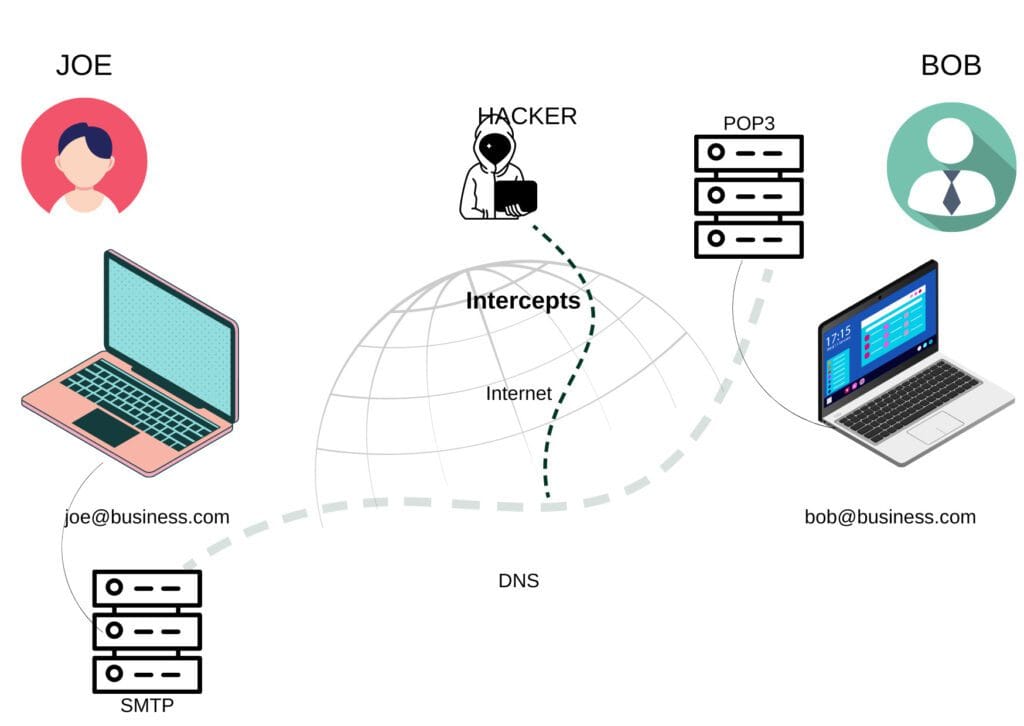
As emails are used as the primary point of communication, employees must be aware of email security to avoid any threats that target their organization via email.
Safe Internet use such as using only HTTPS sites, not downloading pirated software, and password hygiene should be a basic education that should be given to all employees. This can be done during their onboarding process to keep data safe from the start.
12. Malware
Malware prevention best practices include keeping software updated, not downloading unknown attachments, and running regular scans. In 2024, ransomware attacks increased by 37% globally, with phishing emails delivering most payloads (Verizon DBIR 2024). Security awareness best practices focus on proactive habits and quick response to suspicious files.
Cybersecurity training on malware is a critical component of cybersecurity education for employees. Malware, short for malicious software, includes viruses, worms, Trojans, ransomware, and spyware, among other types of malicious software designed to harm or compromise computer systems and data.
Security topics should cover how to recognize malware infections, what actions must be taken, whom to contact in case of a malware attack, and how to prevent such attacks.
13. Browser Security
Browser security best practices include using updated browsers, disabling unnecessary plugins, and using privacy extensions. These steps reduce the risk of drive-by downloads and data leaks, which remain top threats according to Google Safe Browsing statistics (2024).
Use updated browsers to patch known vulnerabilities.
Disable unnecessary plugins to minimize attack surfaces.
Use privacy extensions like uBlock Origin or HTTPS Everywhere for added protection.
Enhancing browser security holds significant importance in the broader realm of Internet security since web browsers serve as the primary entry point to the Internet for the majority of users.
Employees’ cyber security awareness topics should cover current browser security threats and best practices by following updates and security blogs from browser vendors. Employees need to know about the trending browser attacks and threats to be safe from such attacks.
14. Incident Reporting
Incident reporting best practices: Report suspicious activity immediately, provide detailed information, follow up with IT. Rapid reporting can reduce breach impact by up to 50%, according to the 2024 IBM Cost of a Data Breach Report. Organizations with strong reporting cultures detect threats faster and recover sooner.
Encouraging employees to report incidents effectively is essential for maintaining a secure and responsive organizational environment. Often employees do not report what they find suspicious which in case later leads to a critical breach.
Letting employees know the importance of reporting anything they find suspicious can help organizations mitigate such threats in advance in turn avoiding a security breach.
Fun Security Awareness Training Ideas
Fun security awareness training uses interactive and engaging methods to boost participation and retention. Creative approaches like gamification, competitions, and themed events make security memorable and drive real behavior change. Organizations that invest in engaging formats see higher completion rates and improved knowledge retention, according to KnowBe4’s 2024 industry survey.
Gamified modules: Turn training into a points-based game with leaderboards and badges.
Interactive quizzes: Use real-world scenarios and instant feedback to reinforce learning.
Escape room challenges: Teams solve security puzzles to “escape” a simulated breach.
Competitions: Host phishing detection contests with prizes for top performers.
Themed days: Run “Phish Fry Fridays” or “Password Power Hour” to spotlight key topics.
One real-world example: A Fortune 500 retailer ran a month-long security scavenger hunt, resulting in a 38% increase in reported phishing emails and a 22% drop in click rates. Employees cited the competitive format as a major motivator. Fun, interactive training isn’t just a gimmick—it drives measurable improvements in security culture.
Conclusion
The most effective security awareness training programs are those that are engaging, regularly updated, and tailored to current threats. Organizations that update training quarterly see 30% fewer successful phishing attacks (Proofpoint 2024). Security awareness best practices focus on relevance, frequency, and real-world scenarios.
Engage employees with interactive, scenario-based modules.
Update training content to address new threats and tactics.
Emphasize reporting, password hygiene, and phishing recognition.
Measure effectiveness with regular assessments and simulated attacks.
Tailor topics to roles and risk profiles for maximum impact.
These security awareness training topics form the backbone of a resilient security culture. Regular refreshers and practical examples help employees stay alert and prepared for evolving threats.
FAQ’s
What is a Clean Desk Policy?
Clean Desk Policy includes clearing desks at the end of the day, securing sensitive documents, locking computers, shredding unneeded papers, and educating employees about the policy. This policy is crucial in industries handling confidential information to prevent data breaches and promote a culture of security awareness.
What are Data Breaches?
Data breaches occur when unauthorized individuals or entities gain access to sensitive, confidential, or protected information, resulting in the exposure, theft, or compromise of that data. These breaches can occur in various ways and may target personal, financial, medical, or organizational data.
Why is Security Awareness Training Important?
Security awareness training is indispensable in the era of remote work, where understanding the risks associated with working outside traditional office settings is paramount. It not only helps prevent costly data breaches but also bolsters an organization’s reputation by reducing the likelihood of security incidents. Furthermore, it’s a proactive approach to staying ahead of cyber threats, ensuring that employees continually learn about the latest risks and best practices, ultimately strengthening the overall cybersecurity posture.