
Phishing attacks are common and unfortunately, they are growing in prevalence. Attackers have a greater opportunity to conduct these kinds of scams as more and more elements of our lives are conducted online and as technology advances. They frequently target a broad spectrum of people and institutions, ranging from common internet users to major enterprises and governmental bodies. Attackers can carry out phishing assaults relatively easily and cheaply, and if successful, they can result in large rewards. They remain a preferred strategy for cybercriminals as a result.
This article is a guide on creating the best phishing awareness email to employees template to raise awareness about phishing among your employees. We’ll explain why this is important, what to include in the email, and offer practical tips to help your employees spot and avoid phishing attempts. By the end, you’ll know how to create an effective email that helps your team stay safe online.
Phishing is, to put it simply, a ruse or a swindle. It occurs when someone tries to trick you into disclosing to them private or sensitive data, such as credit card details, passwords, or even social security numbers. They could accomplish this by pretending to be a reputable business or organization when they send you emails, texts, or even phone calls. In actuality, though, they are merely attempting to pilfer your data so they may utilize it to do other crimes, such as stealing your identity or money. Thus, it’s critical to exercise caution and refrain from disclosing personal information to people you don’t know well.
What is a Phishing Awareness Email? (Definition & Purpose)
A phishing awareness email is a targeted message sent to employees to educate them about phishing threats, tactics, and safe response practices. Its purpose is to reduce the risk of successful phishing attacks by raising awareness and promoting vigilance. Security teams, HR, or IT departments typically send these emails as part of a broader security awareness program.
Phishing awareness emails often include real-world examples, tips for identifying suspicious messages, and instructions for reporting potential threats. The expected outcome is a measurable decrease in risky behaviors, such as clicking on malicious links. According to the 2023 Verizon Data Breach Investigations Report, 36% of breaches involved phishing, highlighting the need for ongoing employee education. Well-crafted phishing awareness emails help build a security-first culture and support compliance with industry standards.
What should a phishing awareness email include?
An effective phishing awareness email template should include a clear subject line, personalized greeting, concise body explaining phishing risks, actionable steps, a call-to-action, and a closing with contact information. The National Institute of Standards and Technology (NIST) recommends using real-world examples and clear reporting instructions to maximize employee engagement and retention (NIST SP 800-50).
Subject Line: Direct and relevant, e.g., “Stay Alert: Phishing Threats in Your Inbox”
Greeting: Address the recipient by name or team for personalization
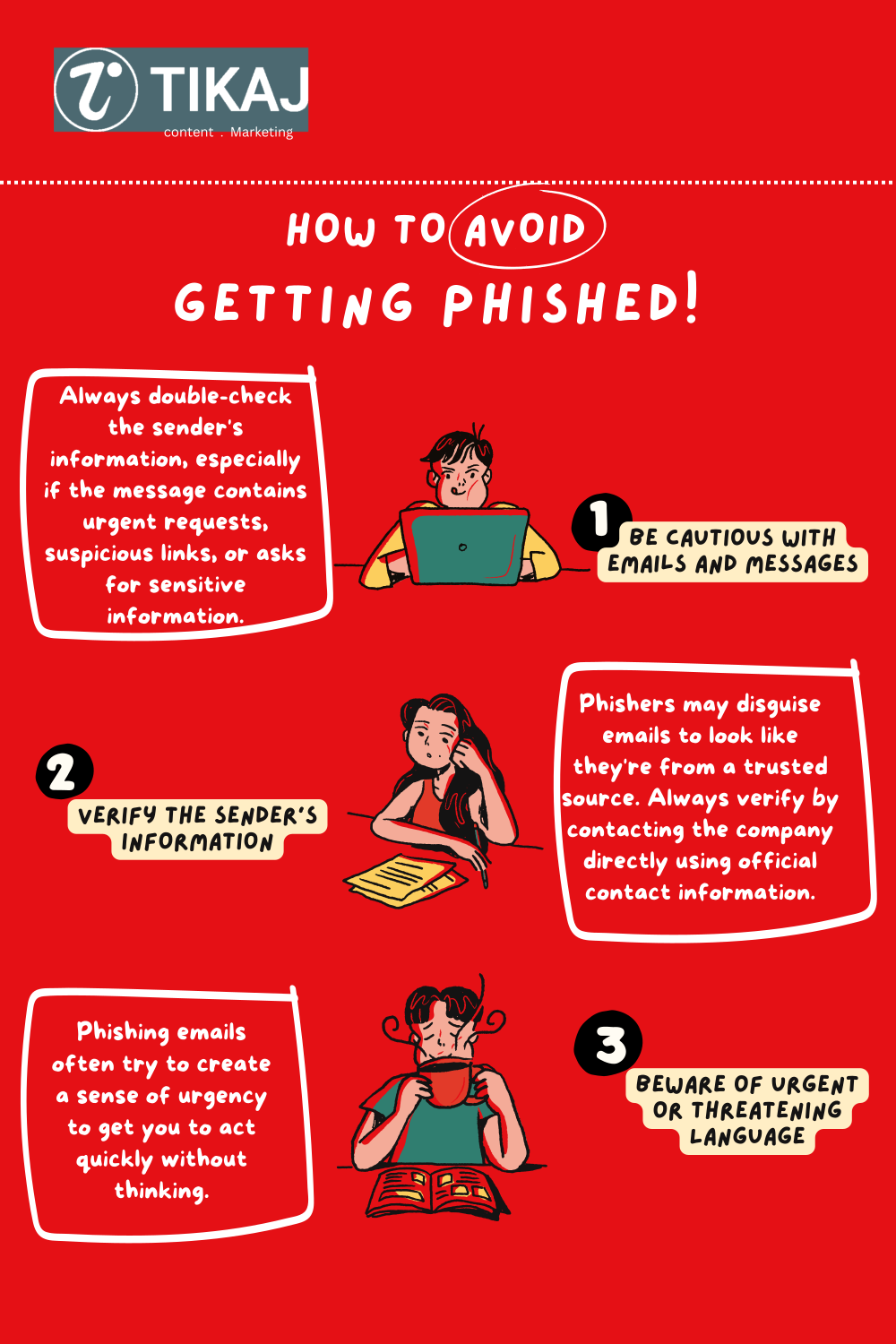
Body: Briefly define phishing, list common signs (urgent language, suspicious links, unknown senders), and share recent examples
Call-to-Action: Instruct employees to report suspicious emails and provide a reporting channel (e.g., IT helpdesk or security email)
Closing: Encourage vigilance, offer further resources, and include IT/security contact details
Best practices from SANS and NIST highlight the importance of keeping messages concise, actionable, and visually scannable. Use bullet points, avoid jargon, and update templates regularly to reflect new phishing tactics. Including real incidents or screenshots increases relevance and retention. Always remind employees that reporting suspicious emails is encouraged, not penalized.
8 Copy and Paste Phishing Awareness Email Templates
Here are all 8 templates. Copy the one that fits, replace the bracketed placeholders, and send it from a person your staff already trust, like your IT lead or security team. Short emails work best. Each template below covers one situation, tells people exactly what to do, and points them to your reporting channel.
Template 1: General awareness announcement
Use it when: you want a baseline reminder that works any time of year.
Subject: How to spot a phishing email before it costs us

Hi [First name],

Phishing emails are the number one way attackers get into companies like ours. They push you to click a link, open an attachment, or type your password into a fake page.

Before you click, check three things:
- Do you know the sender? Look at the full address, not the display name.
- Is the request urgent or unusual? Pressure is the tell.
- Does the link match where it says it goes? Hover before you click.

Not sure? Don't click. Report it with the Report Phish button or forward it to [[email protected]].

Thanks for keeping [Company] safe.
The [Company] Security Team
Template 2: New starter welcome
Use it when: someone joins. New employees are prime targets in their first weeks, before they know what normal looks like.
Subject: Welcome to [Company]: two minutes on email safety

Hi [First name],

Welcome aboard. One quick thing before your inbox fills up: attackers often target new starters with fake emails from "IT", "HR", or "your manager" because you don't yet know who's who.

Three rules that will keep you safe here:
- We will never ask for your password by email. Nobody here will.
- Unexpected invoice, gift card, or urgent payment request? Verify by phone first.
- When something feels off, report it with the Report Phish button. No question is too small.

Glad to have you with us.
The [Company] Security Team
Template 3: Active phishing campaign alert
Use it when: a real campaign is hitting your staff right now and you need everyone warned in minutes.
Subject: Security alert: phishing emails targeting [Company] staff

Hi team,

We're seeing phishing emails sent to [Company] employees right now. They claim to be from [spoofed sender or brand] and ask you to [click a link / reset your password / approve a payment].

If you get one:
- Don't click links or open attachments
- Don't enter your credentials anywhere
- Report it immediately with the Report Phish button

Already clicked or entered your password? Contact [[email protected]] right away. You won't be in trouble. Fast reporting protects everyone.

The [Company] Security Team
Template 4: After a real incident
Use it when: an attack got through and you want lessons shared without naming or shaming anyone.
Subject: What we learned from this week's phishing attempt

Hello [Team],

This week we detected a phishing email that reached several inboxes. It posed as [HR / a vendor / a delivery service] and asked for login credentials. No accounts were compromised, and the people who reported it are the reason we caught it fast.

What made it convincing: [one line on the lure].
What gave it away: [mismatched sender address / odd link / unusual request].

Keep doing this: verify unexpected requests through a second channel, and report anything suspicious to [[email protected]].

Thank you,
The [Company] Security Team
Template 5: After a simulated phishing test
Use it when: someone clicks a simulation. Send it instantly, keep the tone kind, and turn the click into a lesson.
Subject: That was a simulated phishing test. Here's what to look for

Hi [First name],

The email you just clicked was a simulated phishing test run by [Company]. Nothing bad happened. This is a safe way to practise against real attacks.

Here's what gave it away: [urgent tone / mismatched sender address / suspicious link / unexpected attachment].

Next time: hover over links before clicking, check the sender's full address, and report anything odd with the Report Phish button. Reporting a simulation counts as a win, clicking one is just practice.

Want to sharpen up? Here's a 2 minute refresher: [training link].

The [Company] Security Team
Template 6: Quarterly reminder
Use it when: nothing is on fire and you want phishing to stay on people’s minds anyway.
Subject: Quarterly reminder: 30 seconds on phishing

Dear team,

Our quarterly nudge, because attackers don't take quarters off:

- Treat unexpected emails with links or attachments as suspect, even from names you know
- Watch for pressure: deadlines, threats, and "urgent" favours are the classic tells
- Report anything suspicious with the Report Phish button or to [[email protected]]

Reports from staff catch more attacks than any filter we run. Keep them coming.

Thank you,
The [Company] Security Team
Template 7: Finance and leadership: invoice fraud and BEC
Use it when: you’re briefing the people attackers impersonate and target for payments.
Subject: Payment fraud is aimed at you. Here's the drill

Hi [First name],

Finance teams and executives are the top targets for business email compromise. These attacks skip the malware: just a convincing email asking you to pay an invoice, change a supplier's bank details, or buy gift cards.

Our rules, no exceptions:
- Verify every bank detail change by phone, using a number you already have on file
- Treat urgent payment requests from executives as suspect. Confirm in person or by phone
- No gift card purchases by email request. Ever

If a request feels off, it probably is. Forward it to [[email protected]] before acting.

The [Company] Security Team
Template 8: Seasonal alert
Use it when: a high risk period starts: holiday shopping, tax season, or annual reviews. Attackers time their lures to the calendar.
Subject: [Season] scams are here. Two things to watch

Hi team,

Every [holiday season / tax season / review period], phishing spikes with lures built for the moment: fake delivery notices, tax refund offers, bonus announcements, and calendar invites.

Two things to watch this month:
- [Seasonal lure 1, e.g. delivery failure texts and emails]
- [Seasonal lure 2, e.g. fake HR emails about bonuses or reviews]

Same rule as always: don't click, verify through the official app or site, and report anything suspicious with the Report Phish button.

Stay sharp,
The [Company] Security Team
Want the same idea on the attack side? Our phishing email template library has ready-made simulation templates you can pair with these awareness emails, and the free phishing tools let you run the whole loop without a budget.
Phishing Awareness Poster Examples
Phishing email awareness posters are visual tools designed to reinforce key security messages in the workplace. These posters use bold graphics, concise tips, and real-world scenarios to remind employees about phishing risks. Downloadable posters can be displayed in break rooms, near printers, or at entry points to keep security top-of-mind.
Good posters repeat one message each: hover before you click, check the sender, report fast. Rotate them monthly so they don’t fade into the wallpaper, and put the reporting channel on every single one.
Posters complement email campaigns by providing constant visual reminders. Unlike emails, which may be overlooked, posters reach employees at multiple touchpoints. Combining posters, emails, and live training creates a layered approach to awareness.
Channel | Reach | Engagement | Best Use |
|---|---|---|---|
All employees | Moderate (open/click rates 20-40%) | Regular updates, policy changes | |
Poster | On-site staff | High (visual recall) | Constant reminders, quick tips |
Training Session | Targeted groups | Very High (interactive) | Hands-on learning, Q&A |
Cyber Security Awareness Email Templates for Companies
Cyber security awareness email templates help organizations communicate key security topics efficiently. These templates cover a range of threats beyond phishing, such as password security and remote work risks. Three starters you can adapt today:
Password Security Template (All Staff)
Subject: Secure Your Passwords, Simple Steps for Stronger Protection
Body: Weak passwords are a top cause of breaches. Use a unique password for every account and enable multi-factor authentication. Never share your credentials.Remote Work Security Template (Remote Teams)
Subject: Stay Secure While Working Remotely
Body: When working offsite, use company-approved VPNs and avoid public Wi-Fi. Lock your device when away. Report lost devices immediately.Device Security Template (IT/Engineering)
Subject: Keep Your Devices Safe, Update Regularly
Body: Install updates as soon as they’re available. Outdated software is a common entry point for attackers. Contact IT if you notice suspicious activity.
To customize templates, adjust language and examples for each department. For example, finance teams may need extra guidance on invoice fraud, while HR may focus on data privacy. Small companies can use concise templates, while larger organizations may require more detailed instructions and branding. Regularly update templates to reflect new threats and company policies.
What the data says about training results
You don’t have to take the templates’ value on faith. Across 62,460 organisations, baseline simulations catch about 33% of untrained employees, and consistent training plus simulation cuts that risk by roughly 40% within 90 days and up to 86% within a year (KnowBe4 Phishing by Industry Benchmarking Report). Hoxhunt 2026 Phishing Trends Report measured the same pattern from the reporting side: a 6x improvement in report rates within 6 months and an 87% drop in malicious clicks when awareness emails and simulations run continuously instead of once a year. The awareness email is the cheapest part of that loop. See our full phishing click rate benchmarks to judge your own numbers.
Conclusion
Phishing awareness for employees is a critical defense against cyber threats. Regular, targeted security awareness emails help staff recognize and report suspicious messages, reducing the risk of data breaches. CISA and NIST both emphasize that ongoing training and communication are essential for building a resilient security culture.
Key takeaways: Use concise, actionable templates tailored to real threats. Reinforce reporting procedures and update content regularly. Integrate phishing awareness emails into a broader cybersecurity training program for maximum impact.
Download the free templates and posters above to start building a safer workplace today. Encourage employees to stay vigilant, report suspicious activity, and remember that cybersecurity is everyone’s responsibility.
FAQ’s
What is a phishing awareness email?
A phishing awareness email is an email communication sent to employees to educate them about the risks and tactics associated with phishing attacks. These emails often contain tips, examples, and guidance on how to recognize and respond to phishing attempts.
Why is phishing awareness important for employees?
Phishing is a prevalent cyber threat, and employees are often the first line of defense against it. Phishing awareness helps employees recognize suspicious emails and avoid falling victim to phishing scams, thereby protecting sensitive company information.
How often should we send phishing awareness email to employees?
Regularly sending phishing awareness emails is essential to keep the topic fresh in employees’ minds. Aim for a schedule that includes periodic reminders, such as monthly or quarterly, and increase the frequency during high-risk periods.
What content should be included in a phishing awareness email?
A phishing awareness email should include information on common phishing tactics, red flags to watch for, examples of phishing emails, and instructions on how to report suspicious emails to the IT or security team.
How can we make phishing awareness emails engaging for employees?
To keep employees engaged, consider using interactive elements, such as quizzes or simulated phishing exercises. Share real-world examples and success stories of employees who have thwarted phishing attempts.