
Phishing emails are designed to look legitimate, often using familiar names, company branding, urgent requests, or links that appear trustworthy. Some are easy to spot. Others can look surprisingly convincing, particularly when attackers have done their research before sending the message.
The good news is that you don’t need to be a cybersecurity expert to identify many phishing attempts. Checking the sender, examining links, questioning unusual requests, and verifying information through a trusted channel can significantly reduce the chance of falling for one.
Here is a practical step-by-step guide to recognizing and avoiding phishing emails.
What Is a Phishing Email?
A phishing email is a fraudulent message designed to trick someone into taking an action that benefits an attacker. That might mean clicking a malicious link, opening an attachment, sharing credentials, or transferring money.
The email may appear to come from a bank, colleague, manager, service provider, or another organization you recognize. In some cases, the branding and wording can be convincing enough that the message does not immediately look suspicious.
Phishing attacks can take many forms. If you want to explore the different techniques attackers use, see our guide to 25 Types of Phishing Attacks and Examples.
What Are the Signs of a Phishing Email?
There is rarely one perfect indicator. Instead, phishing emails often reveal themselves through a combination of small inconsistencies.
1. The Sender Address Looks Suspicious
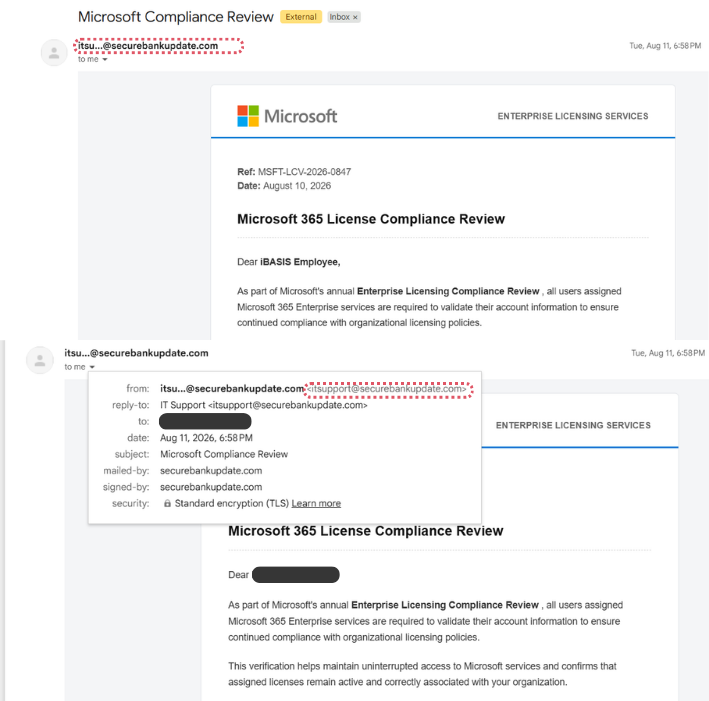
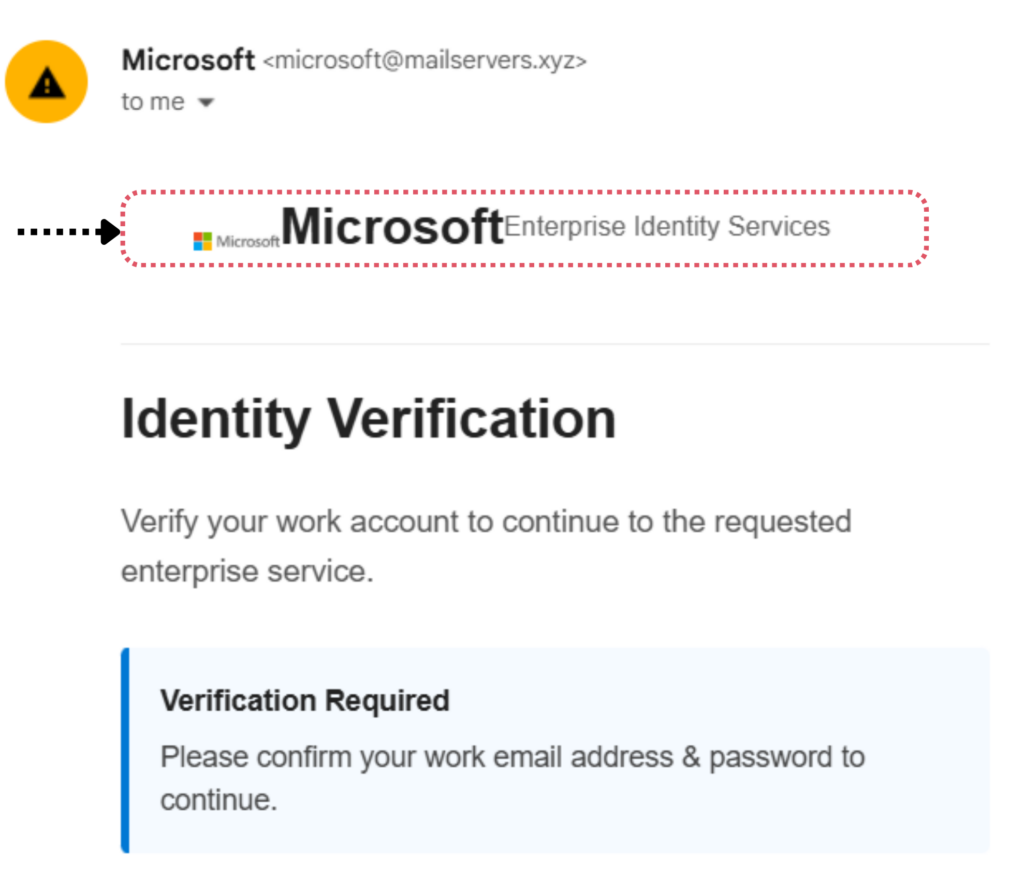
Start with the actual email address, not just the sender’s display name.
An email might appear to come from your IT department, but the address could use an unfamiliar domain or contain a subtle spelling change. Attackers sometimes use domains that closely resemble legitimate ones, making them easy to overlook at first glance.
If the sender is unfamiliar or the address seems unusual, take a closer look before responding.
2. The Email Creates a Sense of Urgency
“Your account will be suspended today.”
“Payment required immediately.”
“Final warning: action required.”
Urgency is a common phishing tactic because it encourages people to act before they have time to question the request. A legitimate organization may occasionally send an urgent message, of course, so urgency alone does not prove an email is malicious.
It is better treated as a reason to pause and verify.

3. The Email Contains a Suspicious Link
Links deserve particular attention.
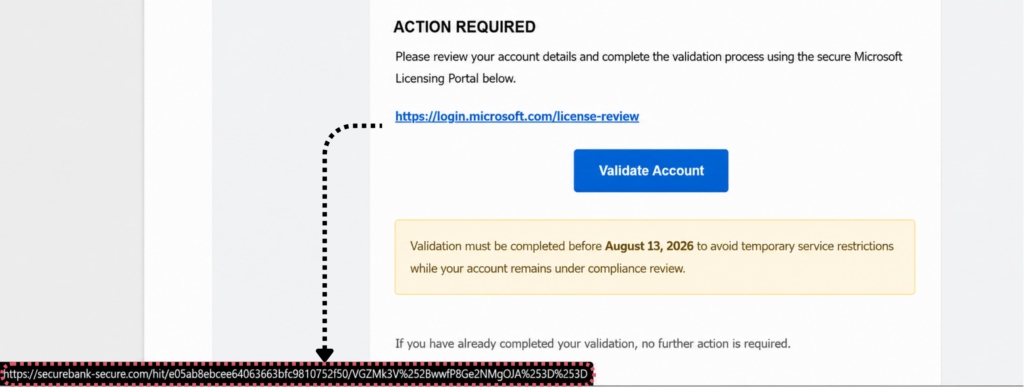
Before clicking, hover over the link to see where it actually leads. If the destination does not match the organization or service mentioned in the email, that is a strong warning sign.
Be especially careful with shortened URLs, unfamiliar domains, and addresses containing unusual characters or spelling variations.
4. It Requests Sensitive Information
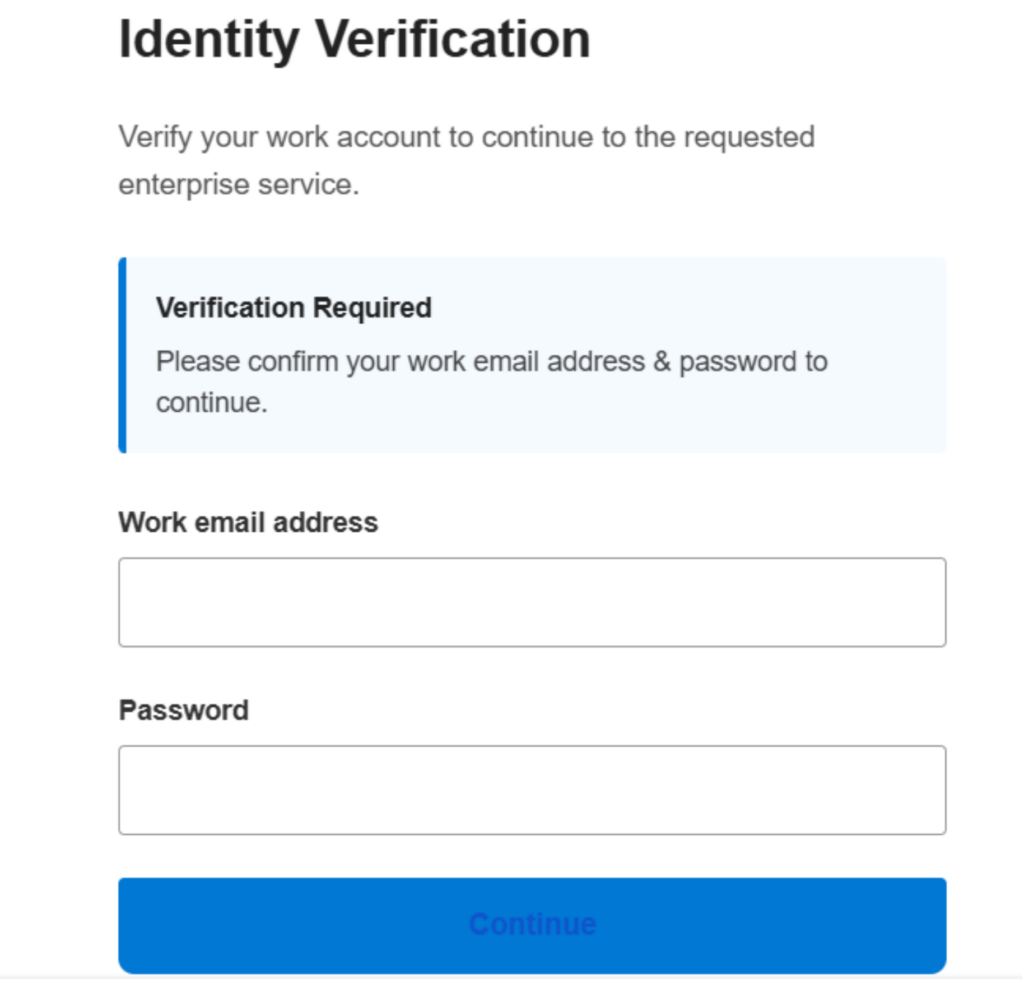
Be cautious when an unexpected email asks for:
- Passwords
- OTPs or authentication codes
- Banking information
- Credit card details
- Personal information
- Login credentials
Reputable organizations generally have established processes for handling sensitive information. If an email suddenly asks you to provide credentials or confidential data, verify the request independently.
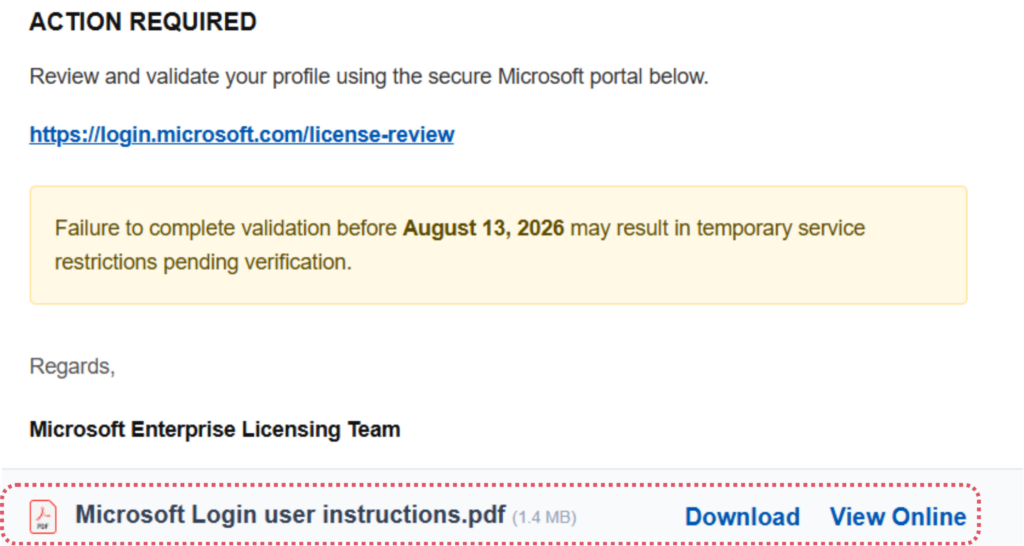
5. It Contains an Unexpected Attachment
An unexpected attachment should make you pause, particularly if the message asks you to open it immediately.
Attackers may disguise malicious files as invoices, reports, resumes, receipts, or other documents that appear relevant to your work.
If you were not expecting the attachment, confirm with the sender through another channel before opening it.
6. The Message Looks Unusual
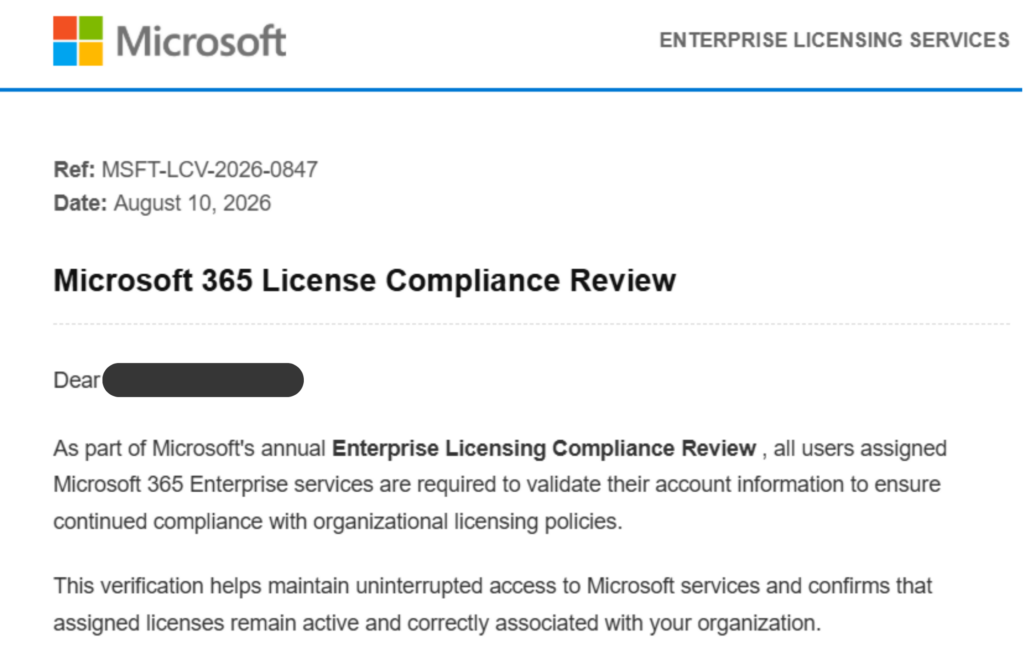
Grammar mistakes used to be one of the easiest phishing indicators. That is becoming less reliable.
Attackers can now produce messages with polished wording and professional formatting. Even so, unusual phrasing, inconsistent branding, strange formatting, or an unfamiliar writing style can still provide useful clues.
The important point is not whether the email contains a typo. It is whether something about the message feels inconsistent with what you normally receive.
7. The Request Is Unusual
A manager asking you to purchase gift cards, a supplier suddenly requesting new bank details, or an IT administrator asking for your password should all trigger additional verification.
The sender may be legitimate. The request may even sound plausible. But unusual requests deserve a second check.
How to Check a Suspicious Email in 5 Steps
When an email seems suspicious, use the following process before taking action.
Step 1: Check the Sender
Look at the complete email address and domain. Don’t rely only on the name displayed in your inbox.
If the address is unfamiliar or contains a subtle variation of a legitimate domain, treat the message cautiously.
Step 2: Inspect Links and Attachments
Hover over links without clicking them. Check the destination carefully.
For attachments, ask yourself whether you were expecting the file and whether the sender normally communicates with you in this way.
Step 3: Question the Request
Take a moment before responding.
Ask:
- Was I expecting this email?
- Does this request make sense?
- Is the sender asking for something unusual?
- Why is there a deadline?
- Am I being asked to provide information I normally wouldn’t share?
That short pause can make a meaningful difference.
Step 4: Verify Through a Trusted Channel
If you are unsure, don’t verify by replying to the suspicious email.
Instead, contact the supposed sender through a known phone number, internal messaging system, or official website.
For example, if an email supposedly comes from your CFO asking for an urgent payment, contact the CFO through your organization’s normal communication channel rather than replying to the email.
Step 5: Report the Email
If your organization has a phishing-reporting process, use it.
Reporting a suspicious email allows security teams to investigate the message and, where necessary, warn or protect other employees who may have received the same campaign.
What Should You Do If You Clicked a Phishing Link?
It happens. The important thing is to respond quickly rather than ignore it.
If you clicked a suspicious link:
- Stop interacting with the page.
- Don’t enter additional credentials or information.
- Report the incident to your IT or security team.
- If you submitted credentials, change the affected password through the legitimate service.
- Follow your organization’s incident-response process.
- Monitor the affected account for unusual activity.
Don’t assume that nothing happened simply because the page looked harmless. If credentials or other sensitive information were entered, the security team should know about it.
How Can Organizations Reduce Phishing Risk?
For organizations, preventing phishing cannot realistically depend on employees recognizing every suspicious email.
Attackers change their tactics, messages become more convincing, and legitimate-looking emails can be difficult to distinguish from malicious ones. Security awareness training can help, but organizations also need a way to understand how employees actually respond to simulated threats.
This is where phishing simulations can help.
Why Phishing Simulations Matter
A phishing simulation sends controlled, realistic phishing scenarios to employees so organizations can measure how they respond.
Instead of asking whether employees know what phishing is, security teams can observe whether they:
- Click suspicious links
- Open simulated attachments
- Submit credentials
- Report suspicious messages
- Improve after training
Measure Human Risk, Not Just Training Completion
Training completion tells you who finished a course. It does not necessarily tell you who is most likely to interact with a phishing attempt.
By combining phishing simulations with behavioral data, organizations can identify higher-risk users, understand trends, and measure whether their security awareness program is actually improving.
For organizations looking to test and measure employee phishing risk, PhishGrid’s Phishing Simulation Platform provides tools for running simulations and tracking employee behavior.
Phishing Email vs. Legitimate Email
| Check | Legitimate Email | Phishing Email |
| Sender | Expected address | Unfamiliar or lookalike address |
| Tone | Normal | Urgent or threatening |
| Links | Expected destination | Suspicious or mismatched destination |
| Request | Expected | Unusual or sensitive |
| Attachment | Expected | Unexpected |
| Verification | Can be independently confirmed | Often discourages verification |
No single row proves that an email is phishing. Look at the overall picture.
If several warning signs appear together, stop and verify the message before taking action.
FAQs About Phishing Emails
How can I tell if an email is phishing?
Check the sender’s address, links, attachments, language, and requested action. An unusual request combined with urgency or a suspicious link is a strong reason to verify the email before interacting with it.
What are the biggest signs of a phishing email?
Common warning signs include suspicious sender addresses, urgent requests, unexpected attachments, suspicious links, requests for sensitive information, unusual formatting, and requests that don’t match normal business processes.
What should I do if I clicked a phishing link?
Stop interacting with the page and report the incident to your IT or security team. If you entered credentials, change the affected password through the legitimate service and follow your organization’s incident-response procedures.
Can phishing emails look legitimate?
Yes. Some phishing emails closely imitate legitimate organizations, colleagues, or business processes. That is why checking the sender, destination URL, and context of the request is generally more reliable than relying on appearance alone.
How can companies test employees for phishing?
Organizations can use controlled phishing simulations to measure employee responses to realistic phishing scenarios. Tracking clicks, reporting behavior, and changes over time can help security teams understand and reduce human risk.